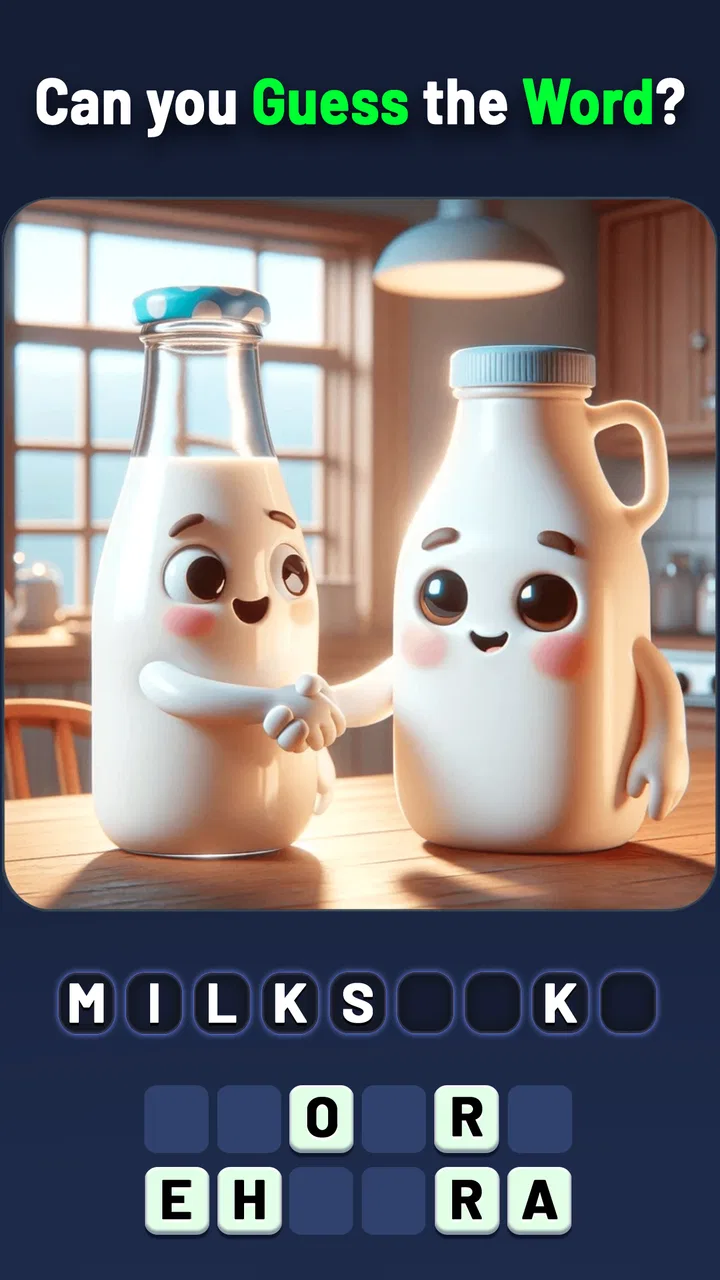
Mindblow: Guess the Word!
- 4.5
- Rating
- 1.00M
- Installs
- Free
- Price

 Analysis by App-foxy
I tried Mindblow: Guess the Word! with the expectations I usually bring to a casual word game: a few minutes to fill a queue, a simple visual puzzle, and enough variety to make returning worthwhile. That description fits the opening experience, but it does not tell the whole story. This is a picture-based guessing game with trivia mixed into its word challenges, made by Kidding Box Studio, and its strongest quality is how quickly it turns an ordinary image into a small act of deduction.
The game is free to start and rated for Everyone, so it is easy to recommend as a low-commitment option for families, casual players, or anyone who enjoys solving clues without learning a complicated rule set. It supports Android devices running version 6.0 or later, which also makes it accessible on older phones. I would not describe it as a deep word-game system, though. Its lasting value depends less on mastery and more on whether you enjoy the steady rhythm of looking, guessing, and moving on.
Why the first week feels so inviting
The early appeal comes from the combination of recognition and uncertainty. A picture gives me an immediate starting point, but it rarely hands over the answer without thought. I look for the obvious object first, then consider whether the intended word might describe an action, a category, a phrase, or a less literal association. That small shift is what keeps the puzzles from feeling like a simple image-labeling exercise.
You May Also Like

 Blood Strike: 2.5 Anniversary
Blood Strike’s Loadouts Turn Every Drop Into a Tactical Gamble
A close look at Blood Strike’s custom loadouts: how fast access to signature weapons reshapes its battle royale rhythm, rewards preparation, and narrows the gap between fights.

 Pandora - Music & Podcasts
Pandora’s Music Is Easy to Start, but Harder to Recover
Pandora’s strength is its low-effort path from a seed to a station. Its weak spot is how much confidence it asks you to place in connection, setup, and quiet recovery.

 8 Ball Pool
 Is Built on Rivalries, Rematches, and Routine
A close look at the rivalries, rematches, shared routines, and unanswered safety questions that turn a quick pool match into a persistent mobile community.

 Samsung Music
’s Quiet Strength Is Playing What You Already Own
Its reach comes less from spectacle than from dependable access to a personal library. That simplicity is both the app’s strongest retention engine and its ceiling.

 AccuWeather: Weather Radar
AccuWeather Review: A Quick, Clear Forecast for Everyday Decisions
For everyday plans, the best forecast is the one you can understand quickly. AccuWeather makes rain timing, radar, and local conditions easy to act on, with a few trade-offs.

 Hill Climb Racing
Why Hill Climb Racing Still Turns Crashes Into One More Run
A tiny car, a bumpy hill and one more upgrade: Hill Climb Racing keeps resurfacing because its simple chaos makes every near-miss feel personal.
More From Our News Desk



When I am waiting for an appointment or taking a short break from work, this format is more comfortable than a traditional crossword. I do not need a pencil, a large amount of uninterrupted time, or a detailed understanding of the board. I can open the game, solve a few visual clues, and stop without losing the thread. That makes it particularly suitable for short sessions rather than long evening play.
The trivia element adds a useful change of pace. Instead of relying only on visual vocabulary, I sometimes have to draw on general knowledge. That mix prevents every round from feeling identical, although it also means the difficulty can feel uneven. A clue based on a familiar image may be immediate, while a trivia question can depend on knowledge I simply happen to have or lack. In those moments, the game tests recall as much as word-solving ability.
I also like that the basic concept is understandable without a tutorial-heavy introduction. The central question is always clear: inspect the image, identify the hidden word or idea, and decide what answer fits. For children, that simplicity lowers the entry barrier. For adults, it means the game can be used as a quick mental reset instead of another app that asks me to learn several systems before becoming enjoyable.
There is a social use case here too. I found the picture clues easy to pass around informally, with one person suggesting an answer and another explaining why a different word might fit better. It works well as a small family challenge, especially when players have different strengths in visual recognition and trivia. The experience is less about competitive performance and more about conversation around the clue.
Its public reception supports that initial impression: the game holds a 4.4 average from around 25 thousand ratings, with roughly 1.3 thousand written reviews and more than a million installs. Those figures do not guarantee that every puzzle will suit every player, but they do suggest that the accessible format has found a broad audience. I can see why it attracts people who want something lighter than a full quiz app and more active than passively scrolling.
How I approach difficult images
One useful habit is to avoid locking onto the first visible object. If the image shows a familiar item, I ask myself what other relationship the picture might be pointing toward. Is the answer a synonym, a compound word, a common expression, or a broader group? This is especially helpful when the obvious label seems too simple for the puzzle.
I also recommend separating certainty from confidence. If I know one part of an answer but not the exact wording, I keep that possibility in mind rather than repeatedly entering random guesses. The game is more enjoyable when I treat each image as a small language problem instead of a speed test. That approach reduces frustration and makes the trivia sections feel like a chance to learn something rather than an interruption.
For younger players, I would play alongside them at first. The Everyone rating makes the game broadly suitable, but a child may interpret an image more literally than the puzzle expects. Talking through alternative meanings teaches a useful vocabulary skill, and it also avoids turning an unfamiliar clue into a discouraging dead end.
What remains after the novelty fades
The more important question is whether the game earns a place on my phone after the first burst of curiosity. In the first week, the answer is usually yes because the format is frictionless and the visual prompts create a steady stream of small surprises. A player who enjoys word association can build a natural routine around it: a few puzzles with morning coffee, a short session during a commute, or a relaxed round before bed.
Month-to-month value is more conditional. This is not the kind of word game where I gradually develop a large strategic toolkit or improve a clearly measurable skill through complex play. My progress is mainly experiential: I become better at recognizing the style of clue and at considering alternate meanings. That is satisfying for a while, but it does not provide the same long-term structure as a crossword archive, a competitive spelling game, or a quiz platform with a strong subject-based progression.
The trivia component helps extend the life of the experience because it broadens the mental territory. If every challenge were only a picture with a single obvious label, repetition would arrive quickly. Trivia gives me a reason to stay curious, but it can also expose the limits of the format. A question that depends on a narrow fact may feel less fair than a picture that rewards careful observation, particularly when I am playing for relaxation rather than testing myself.
That difference matters when deciding what role to give the game. I see it as a companion app for spare moments, not as my main daily brain-training activity. It can support a habit of brief mental engagement, but I would not rely on it alone for sustained vocabulary study. Someone seeking structured language learning would be better served by a dedicated learning app, while someone wanting a broad catalog of clues may prefer a more traditional quiz game.
The current version is 2.8.2, and that is reassuring in the practical sense that the game is not presented as an abandoned experiment. Still, an updated version number does not automatically solve the central retention issue. For me, recurring value comes from how much I enjoy the next clue, not from the mere presence of an update label. If the puzzle style stops surprising me, I have little reason to force a daily streak that the game itself does not make meaningful.
Who is most likely to keep playing?
Mindblow suits players who like visual prompts, broad trivia, and answers that may require a small leap beyond the obvious. It is also a good fit for households where different ages want to play together without dealing with complicated controls. The free entry removes much of the risk: I can test the style in short sessions before deciding whether it deserves regular attention.
I would be more cautious if you need a precise difficulty curve. Players who prefer carefully balanced crossword clues, ranked competition, or transparent strategic progression may find this experience too loose. It is also not my first recommendation for someone who dislikes guessing based on association. Some clues can feel subjective when the intended answer is not the only reasonable interpretation of an image.
People who play exclusively offline should also consider their own routine before committing to it, rather than assuming every mobile game will suit that use. Likewise, anyone sensitive to interruptions or purchase prompts should pay attention to the way the free experience is presented on their device. The game costs nothing to begin, but optional in-app purchases range from $1.99 to $99.99 per item, so I would approach spending carefully and avoid treating convenience purchases as part of the core puzzle experience.
Where the maintenance burden appears
The game is easy to maintain in the everyday sense. I do not need to organize a deck, remember a complicated setup, or preserve a long chain of decisions between sessions. That is one of its quiet strengths. I can leave it untouched for several days and return without feeling behind. For a casual game, that low commitment is more valuable than an elaborate reward system that pressures me to check in.
There is, however, a difference between low maintenance and strong retention. The game asks little of me, but it also gives me fewer reasons to build a lasting routine than a title with personal goals, themed collections, or a clearly evolving challenge. My habit depends on mood and availability. When I want a quick visual puzzle, it is convenient; when I want a sense of achievement that accumulates over time, I usually reach for another category of game.
Storage and device compatibility are unlikely to be major barriers for many users because the minimum operating-system requirement is Android 6.0. That broad compatibility is useful for families sharing older phones or for players who keep a secondary device. On iOS, I would still check the current store requirements before installing, since device support can vary by platform, but the game’s general appeal remains its modest learning curve rather than demanding hardware.
My practical maintenance advice is to treat it as a flexible filler, not an obligation. I would keep notifications and purchase decisions under control, play in short blocks, and stop when the clues begin to feel like repetition rather than entertainment. That preserves the game’s best quality: it is available when I want a small challenge without asking me to reorganize my day around it.
What can cause fatigue over time
The first source of fatigue is the visual format itself. Images are inviting, but a long sequence of them can begin to feel predictable if I approach every puzzle in the same way. The initial pleasure of recognition gradually becomes routine. The trivia questions help break that pattern, yet they can create a different kind of tiredness when the answer depends on a fact I do not know rather than reasoning I can apply.
The second issue is ambiguity. A picture can support several plausible words, and that is sometimes the point, but it can also make a missed answer feel less like a learning moment and more like a mismatch between the player’s interpretation and the game’s intended wording. I am comfortable with that trade-off in a casual guessing game. I would find it more irritating if I were playing for a perfect record or a serious score.
There is also a ceiling to how much strategic depth this format can offer. I can improve my approach, but I cannot transform the puzzle into a rich tactical system. Compared with a crossword, I get less control over the difficulty of the clue. Compared with a word-building game, I have fewer opportunities to plan several moves ahead. Compared with a dedicated trivia app, the knowledge coverage is filtered through the image-guessing concept rather than organized around subjects.
That comparison is not a failure; it clarifies the game’s proper place. I would choose it over a crossword when I want something more visual and forgiving. I would choose it over a competitive word game when I want to avoid pressure. But if I am looking for a long-term challenge with measurable improvement, I would switch to a more structured alternative after the novelty wears off.
The purchase model is another point worth handling thoughtfully. Free access makes experimentation easy, but the range of optional item prices means I would not spend impulsively just to remove a moment of uncertainty. A hint can be useful when I am genuinely stuck, yet solving the clue independently is usually the part that gives the game its value. My rule would be simple: use the free experience to decide whether the puzzle loop itself is satisfying before paying for convenience.
A realistic place in an everyday routine
Imagine a weekday lunch break with ten minutes available and no interest in starting a full game. I can open Mindblow, work through a handful of images, discuss one difficult clue with a colleague, and close it without needing to remember a complex objective. That is where the game feels most natural. It turns a dead interval into light mental activity without demanding the concentration of a crossword or the commitment of a multiplayer match.
Now imagine the opposite situation: I have an entire evening and want a game that keeps unfolding through meaningful decisions. In that case, this would probably not be my first choice. The same simplicity that makes it excellent for a break can make it feel thin during a long session. Knowing that distinction helps prevent disappointment and makes the game easier to appreciate on its own terms.
My long-term verdict
After looking beyond the first-week charm, I think Mindblow: Guess the Word! earns a modest but legitimate place as a casual word-and-trivia game. Its visual clues are approachable, the rules are immediately understandable, and the mix of image interpretation with general knowledge gives short sessions enough variety. I especially like it for shared play, family breaks, and those moments when I want to exercise language and recall without turning the activity into formal study.
Its lasting value is not automatic. The game does not replace a deep crossword collection, a serious vocabulary trainer, or a competitive quiz platform. Ambiguous clues, uneven trivia difficulty, and the limited strategic layer can become tiring for players who want constant progression. The optional purchase range also deserves restraint, because paying for help should not become the reason to continue a puzzle loop that has stopped being enjoyable.
For me, the best way to use it is in small doses. I would install the free game, try it on an older compatible Android phone if needed, and give the first sessions enough attention to learn how its images communicate answers. If the clues continue to make me pause and rethink rather than simply tap through, it can become a pleasant recurring habit. If the pattern starts feeling automatic, I would move on without guilt.
My recommendation is clear but measured: this is a worthwhile free download for casual visual word-game fans, families, and trivia lovers who value convenience over deep progression. It earns lasting space when used as a flexible mental snack, not when forced to serve as a complete long-term gaming hobby. Kidding Box Studio has built an inviting entry point; whether it stays installed depends on how much fresh curiosity the pictures and questions continue to create for you.
FAQs for Mindblow: Guess the Word!
01What is Mindblow: Guess the Word! and how does it work?
Mindblow: Guess the Word! is a word puzzle game designed to challenge your vocabulary and problem-solving skills. Players are presented with scrambled letters and must form correct words to progress through different levels. The game offers various difficulty settings, making it suitable for players of all skill levels.
02Is Mindblow: Guess the Word! free to play?
Yes, Mindblow: Guess the Word! is free to download and play on both Android and iOS devices. However, it offers in-app purchases for additional hints and to unlock premium features. These purchases are optional and not required to enjoy the core gameplay experience.
03Does Mindblow: Guess the Word! require an internet connection?
Mindblow: Guess the Word! can be played offline, making it perfect for on-the-go entertainment without the need for an internet connection. However, certain features, such as leaderboards and daily challenges, require internet access to function properly.
04Are there any age restrictions for playing Mindblow: Guess the Word!?
Mindblow: Guess the Word! is suitable for players of all ages. It features family-friendly content with no explicit material, making it a great educational game for children and a fun challenge for adults. Parents can feel comfortable letting their kids play without supervision.
05How often does Mindblow: Guess the Word! receive updates and new content?
The developers of Mindblow: Guess the Word! regularly update the game to add new levels, features, and improvements based on user feedback. Updates are generally released every few months, ensuring that players always have fresh content and an enhanced gaming experience.
Pros
- Engaging word puzzles keep you hooked.
- Varied difficulty levels for all players.
- Visually appealing with vibrant graphics.
- Frequent updates add new challenges.
- Offline mode available for on-the-go play.
Cons
- Occasional ads can disrupt gameplay.
- Limited hints without in-app purchases.
- No multiplayer mode available yet.
- Some puzzles can be overly difficult.
- Requires frequent updates for new content.

Mindblow: Guess the Word!
Gallery